Little CMS Plugins
Speed plug-ins for the LittleCMS color engine: fast float and multithreaded

LittleCMS ships two optional speed plug-ins included in the standard distribution. Both are open-source under GPL3 and available under a commercial licence for closed-source products. They can be used independently or stacked together for maximum throughput.
⚡ Fast Float Plug-in
Replaces generic interpolation with hand-tuned kernels and SIMD instructions for 8-bit and floating-point color transforms. Detects special cases and shortcuts them entirely.
- ✓ 8-bit, 16-bit & floating-point transforms
- ✓ SIMD acceleration (SSE2 / AVX when available)
- ✓ Photoshop 1.15 fixed-point support
- ✓ Error-diffusion dither output
⚙ Multithreaded Plug-in
Distributes every color transform across all available CPU cores using native threads. Works transparently on top of any transform engine, including the fast float plug-in.
- ✓ Automatic thread-count detection
- ✓ ×8–×12 throughput over single-threaded engine
- ✓ Full 8-bit, 16-bit and CMYK support
- ✓ Zero code changes to existing pipelines
Fast Float Plug-in
What does this piece of software do?
Little CMS floating point plug-in accelerates 8 bit and floating point color transforms, and adds some other features:
- Adds support for internal Photoshop 1.15 fixed point format
- Adds a new formatter to obtain dither on 8 bit for certain color spaces (Gray, RGB and CMYK)
How does it work?
The speedup is accomplished by implementing new interpolation kernels, adding optimizations and re-arranging memory layouts. Additionally, it can use SIMD instructions if present.
What have I to do in order to integrate the plug-in in my code?
The code is already present in the LittleCMS distribution. The simplest way is to add the following include:
#include "lcms2_fast_float.h"
And then, in the initialization part of your program add this line:
cmsPlugin(cmsFastFloatExtensions());
You need also to add the source files into your project. Fine-tuning which transforms are using the plug-in is also possible by means of contexts.
The use case
If you are already using the LittleCMS color engine in your commercial applications, and want a boost on throughput, this plug-in is for you. Open-source projects under GPL3 can also benefit by using the plug-in for free. The idea is to do all the development using the free engine under MIT license and in the case you need more speed for floating-point color transforms, then just add the plug-in code and two lines of code to activate it.
Floating point transformations are using generic code in the free engine, with this plug-in all floating point interpolations are redirected to optimized code that greatly improves the performance in terms of speed.
The requirements of the GPL3 license is, among others, to release your project’s source code. This can be a problem for commercial use, then an alternate commercial license is available at a reasonable fee of 150€. This will help to maintain the development of the engine and the web hosting.
- This quote is for company, you are allowed to use the plug-in in as many products you wish, as long as those are created by same manufacturer.
- License includes perpetual free upgrades to future versions
- Please contact us for more information at sales {at} littlecms {dot} com
Throughput improvements
If you have downloaded the lcms2 package you already have the source code. There is a demo program that prints some statistics. See below an interpretation of the results. Testing has been done in several computers, from a high-performance gaming machine to an average one, mac, mac-mini and a humble mini-pc running debian. Results below are from a mid-to-low end PC.
8 bit profiles
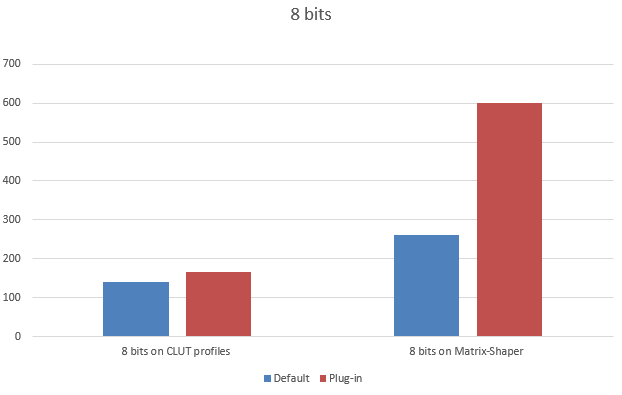
8 bits is what normal screens are, so this kind of transforms are mainly used for display.
The simplest mode is matrix-shaper. The transform goes across a set of curves, then a 3x3 matrix and then across another set of curves. Many so-called “color managed” software components are limited to this mode. It works on RGB or gray scale, plus an optional alpha channel. Then comes CLUT. CLUT is when the transform goes across a 3D look up table using tri-linear or tetrahedral interpolation. This one is not so easy. With this mode sophisticated image editors or viewers can do things like “soft-proofing”, handle viewing conditions or perform emulations.
Whilst the gain on CLUT profiles is moderate, on matrix-shaper the boost is huge. Please note the gain in matrix-shaper is so big that makes CLUT increase to seem small. Make no mistake, it is 20% faster! Values in MegaBytes/Second. Higher is better.
16 bit profiles
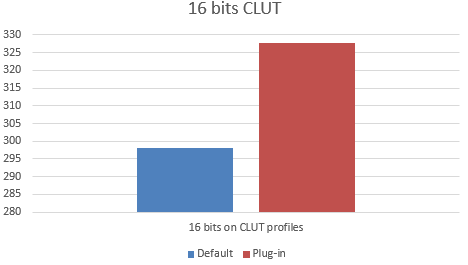
Although the goal of this plug-in is not 16 bits, we have also a special kernel for 16 bits in the plug-in. This is tetrahedral plus tone curves in both sides.
Floating point
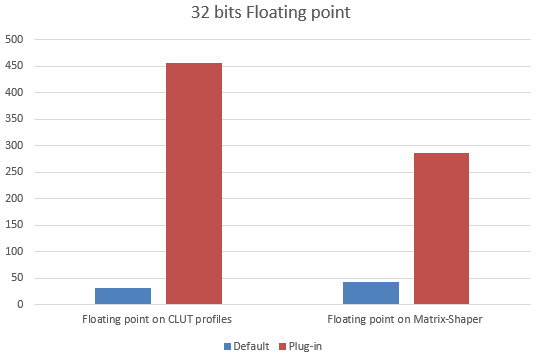
And here we have the true point of the plug-in. Modern image processing often uses linear spaces, which need floating point to avoid posterization. Also this data class allows extended range for unbounded mode, highlights and drop-shadows.
Detecting special cases
Special cases arise continuously. Just imagine you want to display an image and use both the embedded profile and the monitor profile to do color management. Many times, people are using the sRGB profile (or some variant with same primaries) for embedding, and also have the monitor tagged as sRGB. With the plug-in, this situation is detected and speed increases accordingly. Sometimes common sense is the best optimization. Linear sRGB to sRGB is also optimized, for example, as this color conversion would not need any change on primaries but only a tone curve on gamma.
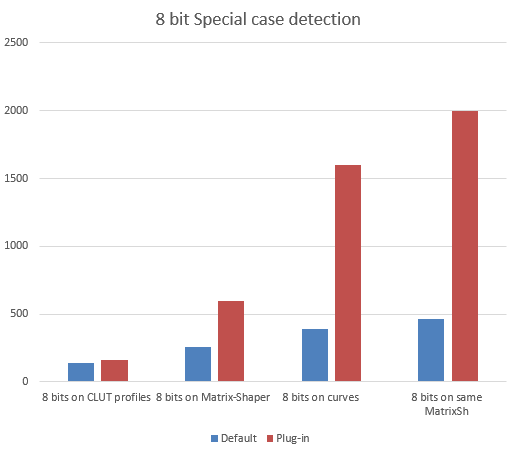
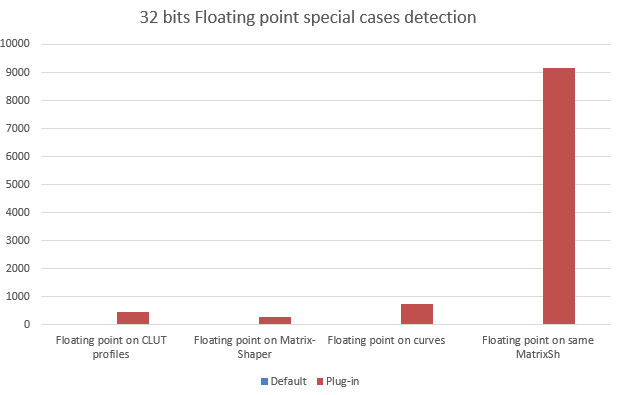
On floating point the gain on special cases is so large that it goes out of scale. Blue bars are so small that they are unnoticeable. Not so the responsiveness of software using this optimization — a completely different user experience.
Dither
Certain operations on image data like color conversion are best done using 16 bits precision, especially when lookup tables and interpolation are involved. ICC profiles typically use 16 bit of precision, as do the transformation engines using those profiles. Although true 16 bit pipelines are being developed, and some are already available as host software, most of today’s hardware is limited to 8 bit precision, causing the result of color conversions to be truncated. This truncation to 8 bits can cause visible and objectionable “banding”, “contouring”, or “posterization” to occur in prints (large areas of “flat” color with abrupt “jumps” in between, where the input shows only smoothly varying gradients). Using true 16 bit pipelines, the problem does not occur.
In order to minimize this effect, a mechanism of error diffusion or “dither” has been implemented in the plug-in. To enable this feature, any of those format specifiers should be used for output only.
- TYPE_GRAY_8_DITHER
- TYPE_RGB_8_DITHER
- TYPE_RGBA_8_DITHER
- TYPE_BGR_8_DITHER
- TYPE_ABGR_8_DITHER
- TYPE_CMYK_8_DITHER
- TYPE_KYMC_8_DITHER
Multithreaded Plug-in
What does this piece of software do?
The Little CMS multithreaded plug-in accelerates color transforms by distributing the workload across all available CPU cores. Unlike the fast float plug-in, which focuses on better per-core algorithms and SIMD, this plug-in adds parallelism on top of whatever transform engine is already active — including the fast float plug-in if both are installed together.
How does it work?
When a transform is executed, the plug-in automatically splits the pixel data into slices and assigns each slice to a separate worker thread. The threads run in parallel, each processing its own portion of the scanlines. The number of threads is determined automatically from the number of logical processors available on the machine, or it can be set explicitly.
The plug-in is built on the LittleCMS parallelization extension point. On Windows, native Win32 threads are used. On all other platforms, POSIX threads (pthreads) are used. The threading layer cooperates transparently with the rest of the transform pipeline and requires no changes to existing image processing code.
What have I to do in order to integrate the plug-in in my code?
The code is already present in the LittleCMS distribution. The simplest way is to add the following include:
#include "lcms2_threaded.h"
And then, in the initialization part of your program add this line:
cmsPlugin(cmsThreadedExtensions(CMS_THREADED_GUESS_MAX_THREADS, 0));
CMS_THREADED_GUESS_MAX_THREADS instructs the plug-in to detect the ideal thread count automatically.
You can also pass an explicit positive integer to control the degree of parallelism yourself.
You need also to add the source files into your project. Fine-tuning which transforms are using the plug-in is also possible by means of contexts.
Combining both plug-ins: If you want the full benefit of optimized kernels and multi-core parallelism, install the fast float plug-in first and the threaded plug-in second. The threading layer will then wrap the already-optimized per-core transforms:
cmsPlugin(cmsFastFloatExtensions());
cmsPlugin(cmsThreadedExtensions(CMS_THREADED_GUESS_MAX_THREADS, 0));
Throughput improvements
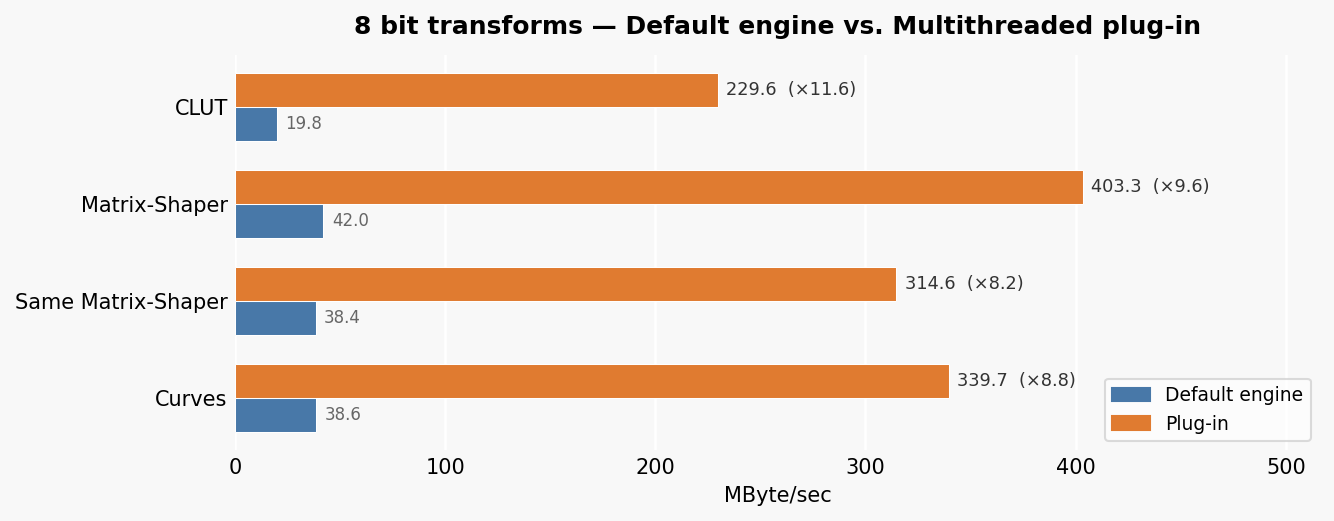
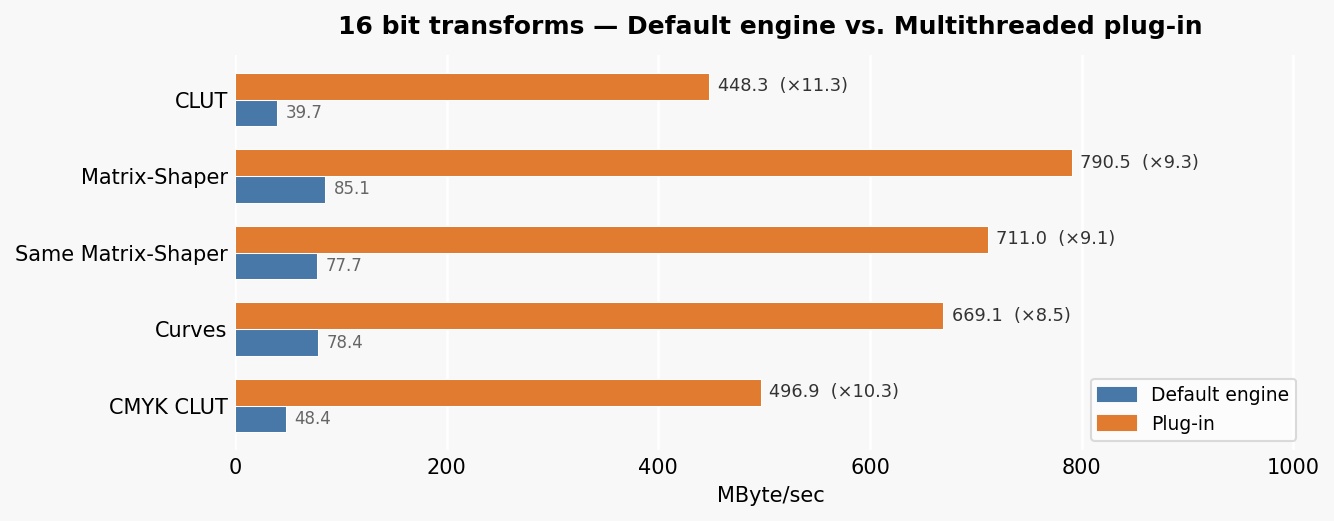
The speedup scales with the number of available CPU cores. Results below are from the same mid-to-low end PC used for the fast float figures. Values in MegaBytes/Second. Higher is better.
8 bit profiles
All common transform types see roughly ×8 to ×12 improvement over the default single-threaded engine.
16 bit profiles
The gain is consistent across CLUT, Matrix-Shaper, curves and CMYK transforms, reaching ×10 and beyond on CLUT profiles.
cmsDoTransform() vs cmsDoTransformLineStride()
The multithreaded plug-in works with both cmsDoTransform() and cmsDoTransformLineStride(). However,
cmsDoTransformLineStride() is the preferred API when processing whole images because it exposes the
scanline geometry to the engine, allowing it to partition work efficiently between threads.
Using cmsDoTransform() forces the plug-in to treat the entire buffer as a single flat span,
which still benefits from threading but at a lower efficiency.
The table below shows throughput in MegaPixels/second:
| Transform | cmsDoTransform() | cmsDoTransformLineStride() |
|---|---|---|
| CLUT profiles (8 bit) | 6.50 | 45.59 |
| CLUT profiles (16 bit) | 6.67 | 77.03 |
| Matrix-Shaper | 13.55 | 78.80 |
| Same Matrix-Shaper | 12.29 | 78.63 |
| Curves | 12.43 | 72.56 |
The difference is dramatic. Providing stride information allows the threading scheduler to divide the
image into independent line ranges and dispatch them with no synchronisation overhead.
For batch processing or any pipeline that feeds whole frames at once, switching to
cmsDoTransformLineStride() is highly recommended.