Stay tuned...
Something truly amazing is about to happen at LittleCMS.
A new chapter in color management is just around the corner. Bigger, smarter, and more capable than anything we’ve released before.
In the past years, I’ve witnessed a new character appear in the open-source ecosystem: what I call the ‘Vibe security researcher.’
Not a security engineer, not a contributor, but someone who points an AI agent at popular repositories, waits for it to flag any theoretical glitch, and then publishes a dramatic ‘high‑severity vulnerability’ report to collect GitHub credit.
And it’s not because AI is suddenly uncovering deep, subtle security flaws. It’s because AI can now generate volume, and some people have learned to turn that volume into visibility. A perfect illustration is CVE-2026-41254
I am glad to the announce the release 2.19 of the Little CMS open-source color engine. This is a featured release.
Changes:
- CMake build system. Thanks to Vlad Erium for the initial implementation and kmilos for improvements.
- Large files support to use profiles up to 4Gb
- Black point compensation works on multi-channel profiles
- Added more test platforms/architectures in GitHub tests, Cygwin and MSYS are now fully checked.
- jpgicc banner is not shown on normal operation, only when help is requested.
- Added a way to access internal transform pipelines. For read only.
- Add a way to retrieve the CMM signature
- Added extra checks on postscript undocumented functions
- Added guard on integer overflow when reading .cube files
- Added unneeded checks as a try to get rid of spam reports about "vulnerabilities" that are not real.
- Utility program names generated by Visual Studio 2026 are now same as all other platforms.
- Creating an output profile by cmsTransform2DeviceLink does not propagate correctly the colorant table. Fixed.
- Added some profile class definitions from iccMAX
- Deprecated uint16 and uint32 types removed from tiffdiff
- fixed generation of tiffdiff on Cmake and meson
Little CMS intends to be an open source small-footprint color management engine, with special focus on accuracy and performance. It uses the International Color Consortium standard (ICC), which is the modern standard when regarding to color management. The ICC specification is widely used and is referred to in many International and other de-facto standards. It was approved as an International Standard, ISO 15076-1, in 2005.
I have been writing color management code for a long time. One frustration that never went away: ICC profiles are opaque by default. You know something is off — a highlight clips, a neutral drifts — but actually reading the profile requires either a hex editor or enough patience to parse the spec by hand.
So at some point I just built a viewer. That became Insighter.
An ICC profile is a binary file structured around a tag table. Each tag has a four-character signature, an offset, and a size. The contents vary wildly — a curv tag holds a tone curve, a XYZ tag holds a three-component tristimulus value, an mft2 or mAB tag holds a full multi-dimensional processing pipeline.
This short article discusses an issue discovered during the AI Cyber Challenge (AIXCC), a remarkable competition where the Little CMS codebase was among the open-source repositories examined. Derek Zimmer from OSTIF reached out to me regarding a potential problem they had identified, and David Korczynski provided all the necessary details.
At first glance, the issue appeared to be a signed integer overflow; nothing more than the usual unpleasantness, with no serious implications beyond producing incorrect colors. It did not seem exploitable. However, when I attempted to fix it, I uncovered a rather intriguing and unfortunate coincidence that makes this bug worthy of a detailed write-up. I hope you find it interesting.
I am glad to the announce the release 2.18 of the Little CMS open-source color engine. This is a maintenance release.
Changes:
Little CMS intends to be an open source small-footprint color management engine, with special focus on accuracy and performance. It uses the International Color Consortium standard (ICC), which is the modern standard when regarding to color management. The ICC specification is widely used and is referred to in many International and other de-facto standards. It was approved as an International Standard, ISO 15076-1, in 2005.

Color management is often a silent partner in digital workflows, critical, yet invisible. With the Monitor ICC Tweaker, I wanted to break that silence and give professionals a tool that not only refines display profiles but does so with visual feedback, CIECAM16 appearance modeling, and .CUBE LUT integration.
This isn’t just another utility. It’s a bridge between scientific modeling and practical control, designed for those who demand accuracy without sacrificing usability.
I’ve been using Qt, by Qt Group for years and I must confess I am delighted. Many toolkits promises the mantra “Code once and run everywhere”, but indeed this works with Qt. Qt6 was announced few days ago. They now include some sort of color management on images QColorSpace, but still no neat way to use complex ICC V4 pipelines.

In this small article I will show you how to do true RGB color management in Qt, by using LittleCMS, with very few lines of code.
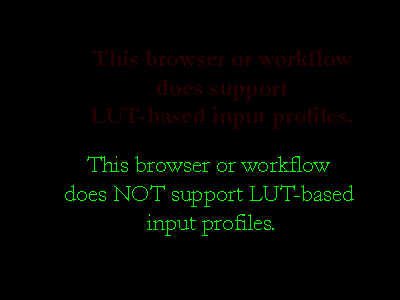
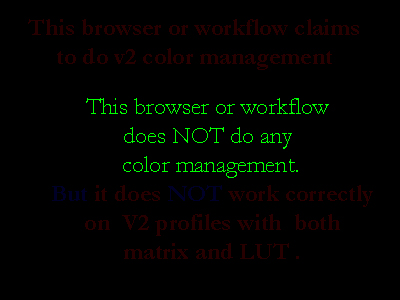
As some users asked for this, I am recovering an old test I posted in lcms blog many years ago. Basically, it uses special images with crafted embedded profiles. If profiles are correctly honored, a text will show up. But not all web browsers behave equally.
Here are the old tests. They only check V2 compatibility.


No surprises. The images are using embedded profiles to do the trick. A self-explanatory text shows up on each image.
GIMP 2.10 release notes
“GIMP now uses LittleCMS v2, which allows it to use ICC v4 color profiles. It also partially relies on the babl library for handling color transforms, since babl is simply up to 10 times faster than LCMS2 for the cases we tested both of them on. Eventually babl could replace LittleCMS in GIMP.”
OMG! something seems very wrong with the Little CMS engine!! How it can be so slow despite all optimizations it internally has? Should I plan a major rewrite for those parts?
Copyright © 1998 - 2026, Marti Maria Saguer; all rights reserved.
privacy policy.
Template by Bootstrapious. Ported to Hugo by DevCows.