Lcms2

Interger overflow

Integer overflow

(Download the PDF)

Introduction

This short article discusses an issue discovered during the AI Cyber Challenge (AIXCC), a remarkable competition where the Little CMS codebase was among the open-source repositories examined. Derek Zimmer from OSTIF reached out to me regarding a potential problem they had identified, and David Korczynski provided all the necessary details.

At first glance, the issue appeared to be a signed integer overflow; nothing more than the usual unpleasantness, with no serious implications beyond producing incorrect colors. It did not seem exploitable. However, when I attempted to fix it, I uncovered a rather intriguing and unfortunate coincidence that makes this bug worthy of a detailed write-up. I hope you find it interesting.

Continue reading

Little CMS 2.18 released

Little CMS 2.18 released

I am glad to the announce the release 2.18 of the Little CMS open-source color engine. This is a maintenance release.

Changes:

  • Add an extra check for completeness only.
  • Fix a signed integer overflow which could trigger a FPE_INTOVF
  • Fix Microsoft'2 MHC2 private tag
  • Added projects for XCode 26 & Visual Studio 2026
  • Added documentation for PCS illuminants and chromatic adaptation
  • Check for a possible out-of-bounds in softproofing transforms when using cmsCreateExtendedTransform
  • Fix for a out-of-bound read, issue #522
  • Add an extra check for out-of-bounds read when misusing a support function
  • avoid divide by zero, special case from spec. notes on CAM02
  • Fix CGATS parser bug when number has a “+” sign
  • Fix a typo when handling a special case for BPC
  • Fixed a loss of precision when Lab16 is used as input color space on integer transforms
  • Fixes hypotetical corrupted pointer in non-happy path. Cannot happen in real world
  • Fix a theoretical memory leak.
  • Add support of localized descriptions in v2 profiles for MacOS
  • Mark some tables as const
  • Make the param of cmsCreateLab4Profile() to refer to the media white instead of the illuminant
  • fix a warning in unit tests
  • Remove redundant check. Fixes #497
  • Update autotools
  • fix plugins soname + add oklab to transicc (experimental)
  • meson: ability to disable .so.version libraries
  • Fix black point detection when using darker colorant.
  • testcms2.c: Fix incorrect string comparisons
  • Fix CICp tag size.
  • Fix broken linkicc
  • meson: Bump minimum Meson version to 0.52 for visibility:hidden
  • meson: Disable unused fs import
  • Add a guard against a wrong use of flags
  • Fix for #469 heap buffer overflow on convert_utf16_to_utf32()

Little CMS intends to be an open source small-footprint color management engine, with special focus on accuracy and performance. It uses the International Color Consortium standard (ICC), which is the modern standard when regarding to color management. The ICC specification is widely used and is referred to in many International and other de-facto standards. It was approved as an International Standard, ISO 15076-1, in 2005.


Continue reading

Color Management on Qt with LittleCMS

I’ve been using Qt, by Qt Group for years and I must confess I am delighted. Many toolkits promises the mantra “Code once and run everywhere”, but indeed this works with Qt. Qt6 was announced few days ago. They now include some sort of color management on images QColorSpace, but still no neat way to use complex ICC V4 pipelines.


Qt


In this small article I will show you how to do true RGB color management in Qt, by using LittleCMS, with very few lines of code.

Continue reading

Babl throughput comparative

From time to time, I discover wonderful things like this:

GIMP 2.10 release notes

“GIMP now uses LittleCMS v2, which allows it to use ICC v4 color profiles. It also partially relies on the babl library for handling color transforms, since babl is simply up to 10 times faster than LCMS2 for the cases we tested both of them on. Eventually babl could replace LittleCMS in GIMP.”

OMG! something seems very wrong with the Little CMS engine!! How it can be so slow despite all optimizations it internally has? Should I plan a major rewrite for those parts?

Continue reading

Visualizing gamuts

Days ago, a very interesting question arose in the mailing list.

How can I visualiza the gamut of a profile?

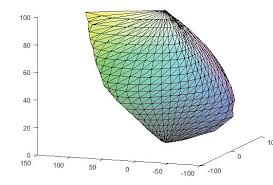
Little CMS does not offer direct tools to do that. But with some code, it is easy to do so. Be warned there is some hacking required.

A typical profile can be thought as a “black box” that translates values from a colorimetric space, usually CIE L*a*b*, to a device space. For example, RGB in a screen profile. Since the range of realizable colors (the gamut) is limited on real devices, not all Lab values would have a corresponding RGB. Only the Lab values that are inside monitor gamut would be displayed.

Continue reading